
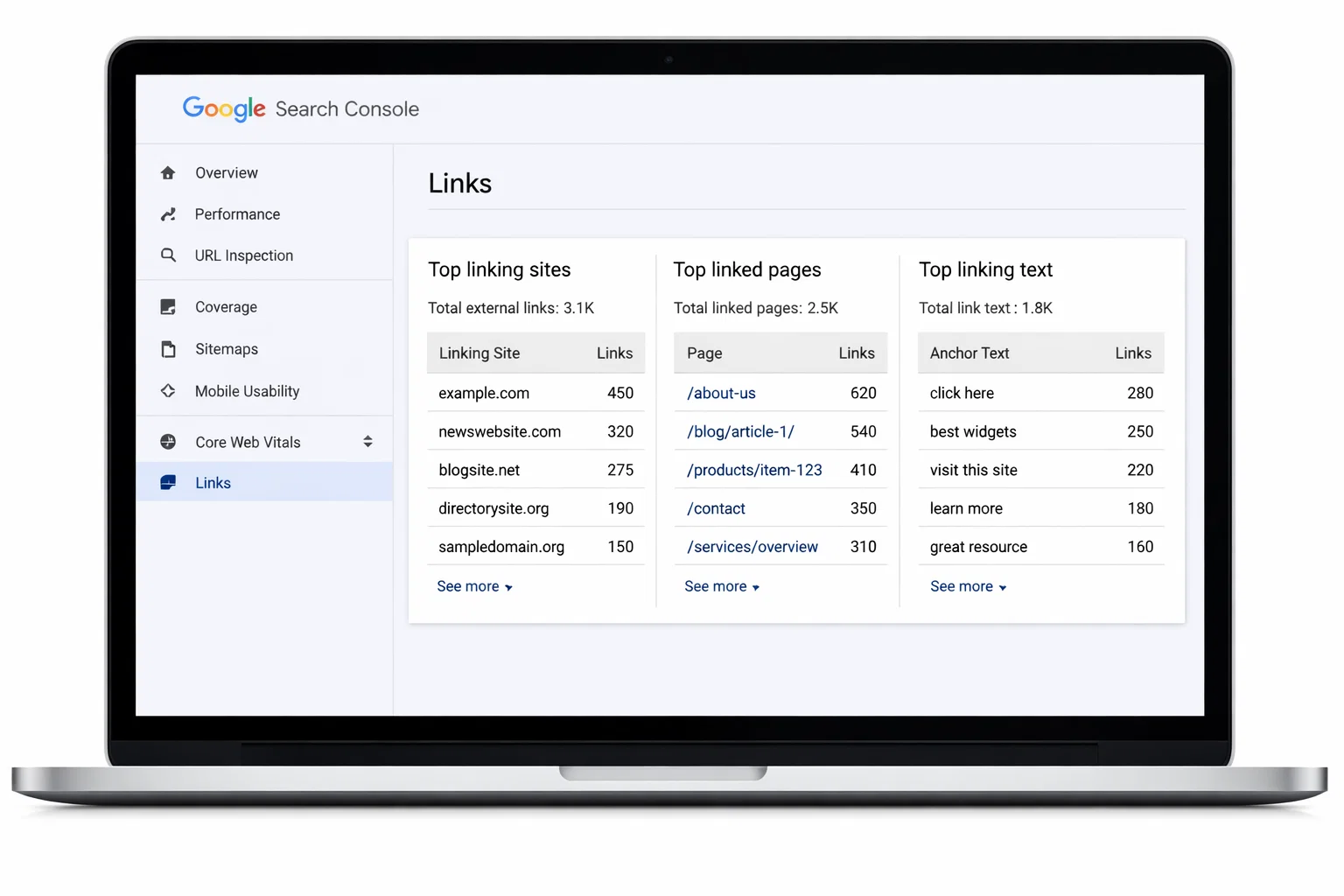
Backlinks can be checked in Google Search Console by opening the Links report, where Google shows verified external links pointing to your website. This helps you understand which sites link to you and how Google views your backlink profile. For deeper analysis, SEO Specialist USA offers a free backlink audit.
Key Takeaways
- ✔ Google Search Console lets you check backlinks directly from Google’s own data
- ✔ You can view top linking sites, linked pages, and anchor text in the Links report
- ✔ Google Search Console does not show all backlinks or backlink quality metrics
- ✔ Regular backlink checks help identify growth opportunities and risks
- ✔ SEO Specialist USA provides professional backlink analysis beyond GSC limitations
How to Check Backlinks in Google Search Console
Google Search Console provides a dedicated Links report that shows how other websites link to yours.
Follow these steps to access and analyze your backlinks correctly.
Step 1: Open Google Search Console
Log in to your Google Search Console account and select the correct website property.
If possible, choose the Domain property, as it provides a more complete backlink overview compared to a URL-prefix property.
Step 2: Navigate to the “Links” Report
From the left-hand menu, click on Links.
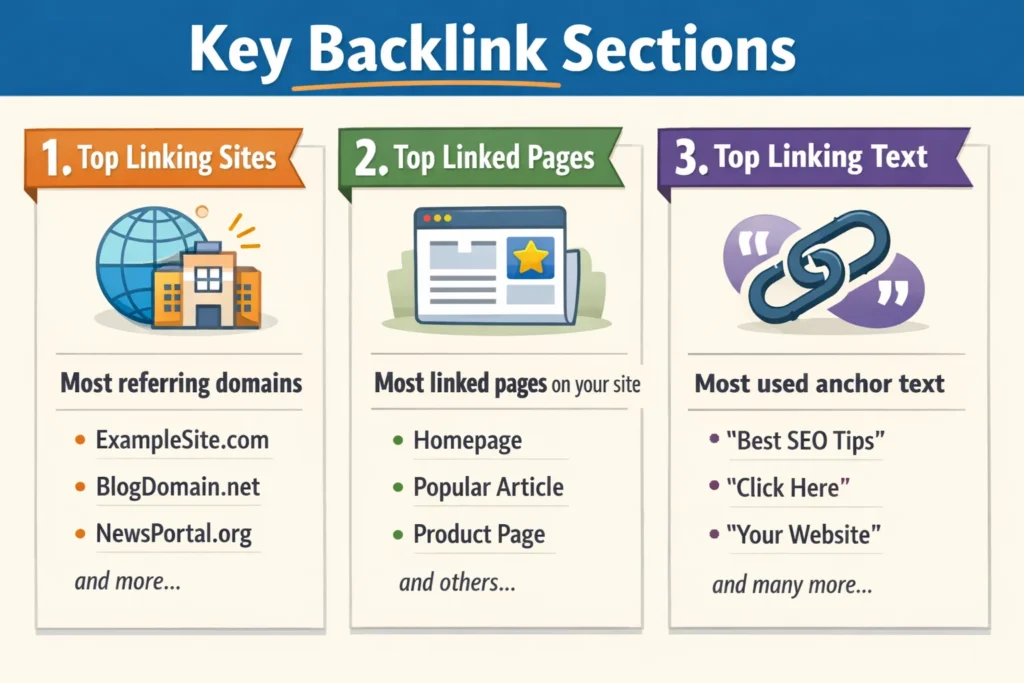
Under the External links section, Google displays backlink data grouped into three main categories:
- Top linking sites
- Top linked pages
- Top linking text (anchor text)
Step 3: View Top Linking Sites
The Top linking sites section shows which domains link to your website most frequently.
Click More to expand the full list and identify:
- High-authority referring domains
- Repeated or suspicious domains
- Opportunities for future partnerships or outreach
Step 4: Analyze Top Linked Pages
This section reveals which pages on your site receive the most backlinks.
Reviewing these pages helps you understand:
- Which content attracts links naturally
- Which pages should be further optimized or promoted
Step 5: Review Anchor Text
Under Top linking text, you’ll see the anchor text used by other sites when linking to you.
A healthy backlink profile typically includes:
- Branded anchors
- Natural phrases
- Limited exact-match keywords
Over-optimized anchor text can signal risk and should be monitored carefully.
What Are Backlinks and Why They Matter for SEO
Backlinks, also known as inbound links, are links from other websites that point to your site. Search engines like Google use backlinks as a trust signal to measure a website’s authority and relevance.
High-quality backlinks from reputable sites can improve search rankings, increase organic traffic, and strengthen domain credibility. On the other hand, low-quality or spammy backlinks can negatively impact SEO performance. This is why regularly checking and analyzing your backlink profile is essential for long-term search visibility.
What Data Google Search Console Shows (and What It Doesn’t)
Google Search Console provides reliable, Google-verified backlink data, but it’s important to understand its scope and limitations.
What Google Search Console Shows
- Verified external backlinks recognized by Google
- Top linking websites (referring domains)
- Most linked pages on your website
- Anchor text used in backlinks
This data helps you understand how Google currently views your backlink profile.
What Google Search Console Does NOT Show
- All existing backlinks across the web
- Lost or broken backlinks
- Backlink quality scores
- Toxic or spam link detection
- Competitor backlink profiles
Because of these limitations, Google Search Console should be seen as a starting point, not a complete backlink analysis solution.
Limitations of Using Google Search Console for Backlink Analysis
While Google Search Console is useful, it doesn’t provide the full picture needed for advanced SEO decision-making.
Key limitations include:
- Backlink data updates can be slow and incomplete
- No visibility into toxic or harmful backlinks
- No competitor backlink comparison
- No insights into link strength or authority
- Limited filtering and reporting options
Relying only on Google Search Console may cause you to miss backlink risks and growth opportunities that impact rankings over time.
Why Professional Backlink Analysis Is Better Than Google Search Console Alone
Professional backlink analysis goes beyond basic Google Search Console data by combining multiple tools, manual review, and expert evaluation.
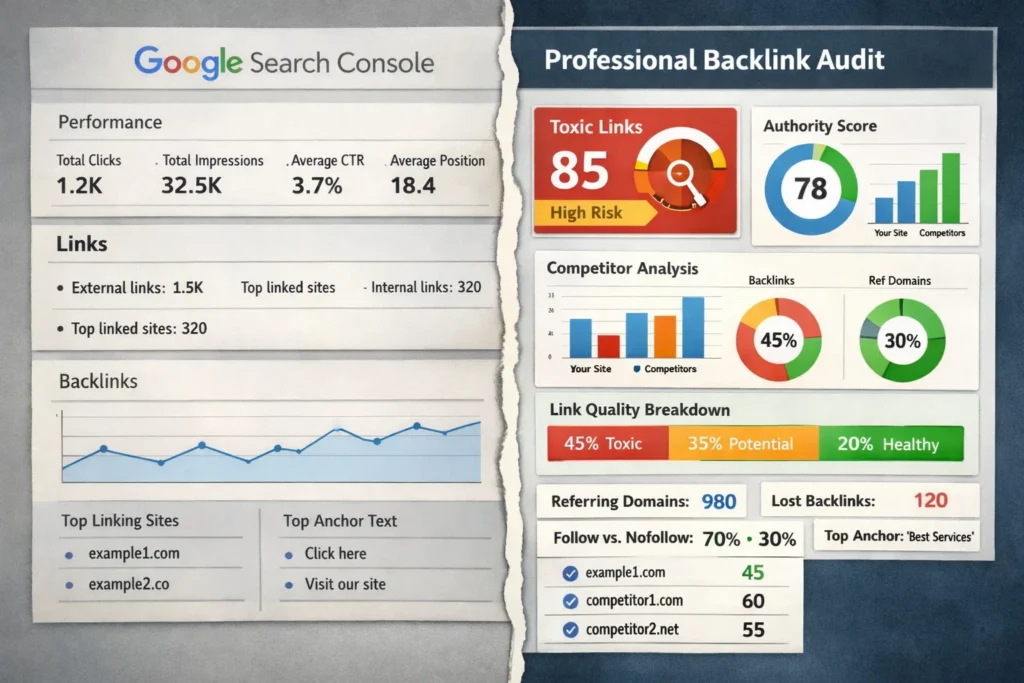
With a professional backlink audit, you get:
- Full backlink coverage across the web
- Toxic link detection and cleanup recommendations
- Competitor backlink gap analysis
- Link quality and authority evaluation
- Actionable insights for link-building strategy
This level of analysis helps businesses avoid penalties, improve rankings, and build long-term SEO authority, something Google Search Console alone cannot deliver.
CTA: Get a Backlink Audit
How SEO Specialist USA Helps Improve Your Backlink Profile
SEO Specialist USA provides data-driven backlink strategies designed to strengthen authority and improve search visibility.
Their backlink services include:
- Comprehensive backlink audits using professional SEO tools
- Identification and mitigation of toxic or low-quality links
- Strategic link-building recommendations tailored to your industry
- Competitor backlink analysis to uncover missed opportunities
- Ongoing monitoring and transparent reporting
By combining technical expertise with ethical SEO practices, SEO Specialist USA helps businesses build a strong and sustainable backlink profile.
Best Practices for Analyzing Backlinks
To get the most value from your backlink data, follow these best practices:
- Focus on link quality, not just quantity
- Monitor anchor text for over-optimization
- Review referring domains regularly for relevance and authority
- Identify and address spammy or low-quality links early
- Track backlink growth trends over time
Consistent backlink analysis helps maintain a healthy SEO profile and supports long-term ranking stability.
Frequently Asked Questions
Does Google Search Console show all backlinks?
No. Google Search Console only shows backlinks that Google has discovered and verified. Many backlinks may not appear, which is why professional SEO tools and audits are recommended.
How accurate are backlinks in Google Search Console?
The backlinks shown in Google Search Console are accurate but limited. They represent Google’s view of your links, not your complete backlink profile.
How often should I check backlinks in Google Search Console?
It’s best to review backlinks at least once a month or after major SEO campaigns to monitor link growth and detect potential issues early.
What is the best way to check backlinks?
Using Google Search Console alongside professional backlink analysis tools provides the most accurate and actionable insights.
Do I need an SEO agency to analyze backlinks?
While basic checks can be done in Google Search Console, an SEO agency offers deeper insights, competitive analysis, and strategic recommendations.
Discover More SEO Guides with SEO Specialist USA
Looking to deepen your SEO knowledge? SEO Specialist USA regularly publishes expert guides to help businesses understand search engine optimization, improve rankings, and drive sustainable growth.
Explore more SEO resources and learn proven strategies backed by real-world experience from U.S.-based SEO professionals.