
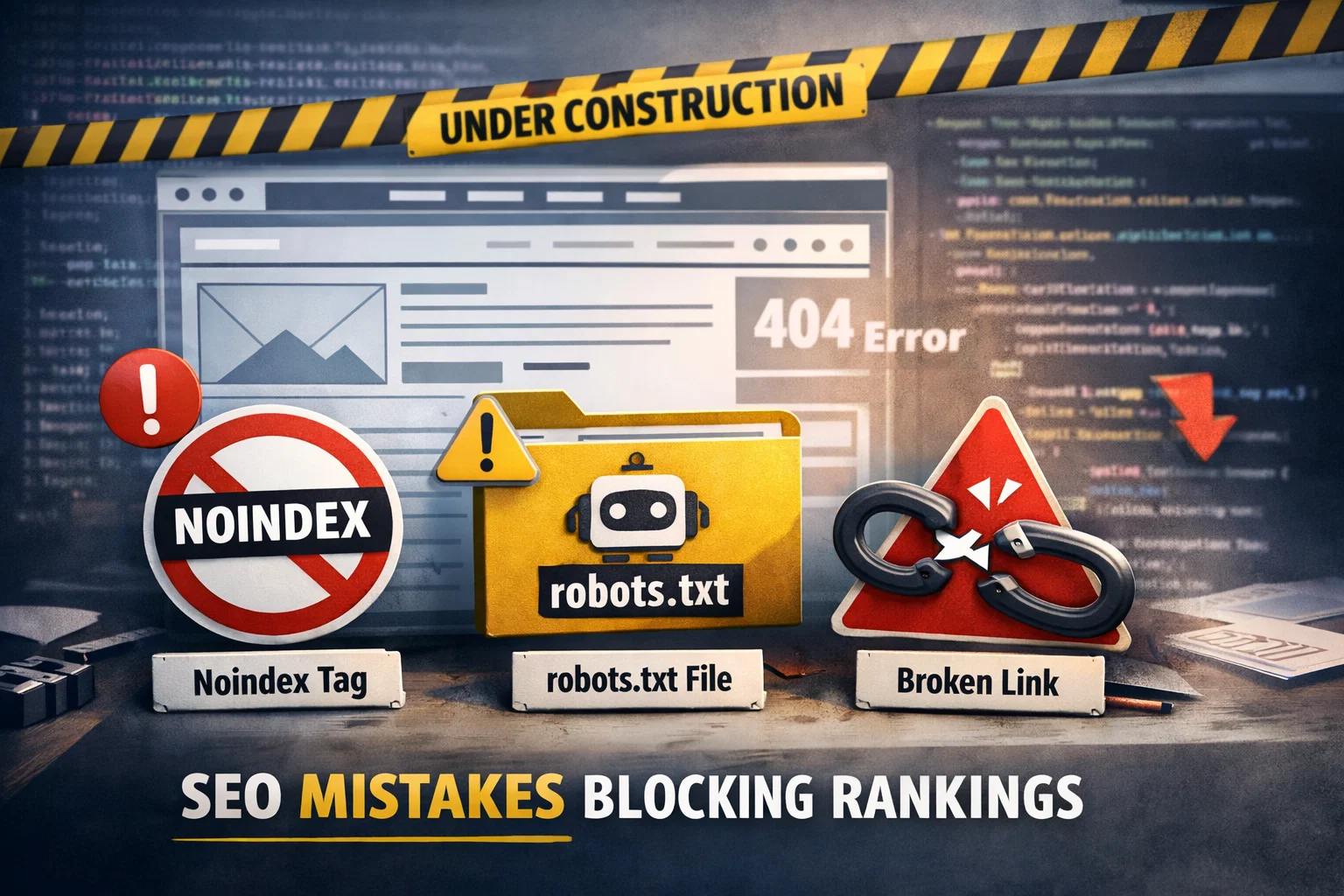
When developing a search-optimized website, avoid blocking search engines with incorrect settings, building a confusing site structure, and publishing thin or duplicate content. You should also avoid slow-loading pages, poor mobile usability, and missing on-page SEO elements like proper headings, titles, and internal links.
Key Takeaways
-
 Avoid robots.txt and noindex mistakes that block Google from crawling your site.
-
Don’t launch without checking indexability, canonicals, redirects, and sitemap.
-
Poor site structure and weak internal linking reduce crawl efficiency and rankings.
-
Thin, duplicate, or keyword-stuffed content can stop your site from ranking.
-
Slow performance and weak Core Web Vitals harm both SEO and user experience.
-
Mobile-first design is critical, avoid layouts that break on phones.
-
Track SEO properly using Google Search Console and GA4 from day one.
Why Avoiding SEO Mistakes Matters During Website Development
When SEO mistakes happen during development, they typically cause one of these outcomes:
- Google can’t crawl your site properly, meaning your pages won’t even appear in search results.
- Your content gets indexed, but fails to rank due to weak structure, poor relevance, or technical issues.
- The site ranks initially, but drops over time because of performance problems, duplicate content, or bad internal linking.
- Visitors land on your pages but leave quickly due to slow speed, confusing navigation, or poor mobile UX, which indirectly hurts SEO.
SEO Problems Are Cheaper to Prevent Than Fix
For example, if your website launches with:
- Broken redirects
- Duplicate URLs
- Missing canonicals
- Blocked pages
You may end up needing a full technical cleanup, and in some cases, rankings can take weeks or even months to recover.
A Search-Optimized Website Supports Growth
When you avoid common SEO mistakes early, your website becomes:
- Easier for Google to understand
- Faster to crawl and index
- Better structured for users
- Stronger at converting visitors into leads
That’s why SEO-friendly development is not just about rankings — it’s about building a website that performs well across search, user experience, and conversions.
Technical SEO Mistakes to Avoid (Most Common Issues)
Technical SEO mistakes are some of the most damaging because they can prevent your website from being crawled or indexed at all. In other words: you might have great content and design, but Google may never properly “see” it.
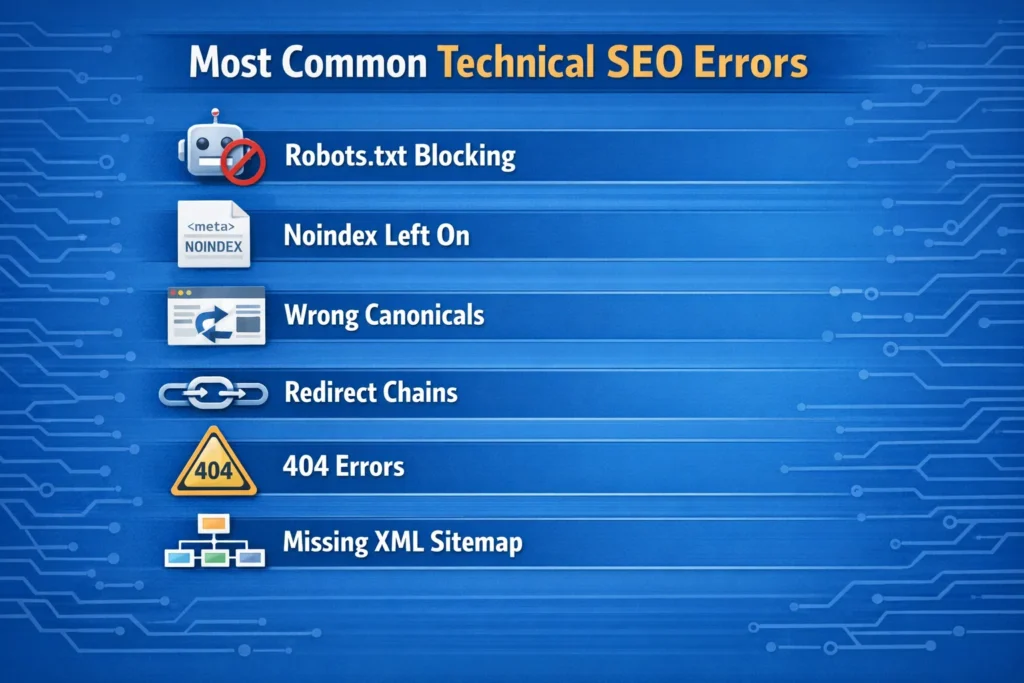
Below are the most common technical issues you should avoid when developing a search-optimized website.
Blocking Search Engines Accidentally (robots.txt, noindex, password protection)
One of the most common SEO mistakes happens during staging and launch. Developers often block search engines during development using:
- robots.txt disallow rules
- noindex meta tags
- password protection
- restricted server access
This is fine on a staging site, but if these settings remain after launch, your pages may not appear in Google at all.
- Your live site is crawlable
- Important pages are indexable
- Your staging site is not accidentally being indexed
Tip: Always run a final indexability audit before launch.
Poor Crawlability and Indexability
Even if Google can access your site, it doesn’t mean it can crawl it efficiently. Common crawlability issues include:
- Too many unnecessary URLs (filters, parameters, session IDs)
- Pages buried too deep (4–6 clicks away)
- Broken internal links
- Inconsistent navigation structure
- Orphan pages with no internal links
A search-optimized website should guide search engines clearly through category pages, service pages, blog posts, and conversion pages.
Wrong Canonical Tags and Duplicate URL Versions
Duplicate content can occur even without copying text. Your site may generate multiple versions of the same page:
- https://example.com
- https://www.example.com
- http://example.com
- https://example.com/
- https://example.com/index.html
If canonical tags aren’t set correctly, Google may index multiple versions, split ranking signals, and reduce overall visibility.
Fix this by ensuring: one preferred domain is selected, canonicals are consistent, and internal links always use the preferred version.
Broken Redirects, Redirect Chains, and 404 Errors
During website redesigns or migrations, redirect issues are extremely common. Mistakes to avoid include:
- Sending old URLs to irrelevant pages
- Creating redirect chains (URL A → B → C)
- Leaving high-value pages as 404 errors
- Redirecting everything to the homepage
Redirect problems can lead to ranking drops, loss of backlink value, poor user experience, and wasted crawl budget.
Missing or Incorrect XML Sitemap Setup
An XML sitemap helps search engines discover and prioritize your pages — but only if it’s built correctly.
- Sitemap includes noindex pages
- Sitemap includes 404 or redirected URLs
- Sitemap not submitted to Google Search Console
- Multiple sitemaps with conflicting URLs
- Sitemap not updating automatically
- include only canonical, indexable pages
- update when new pages are added
- be submitted in Google Search Console
Website Structure Mistakes That Hurt Rankings
A search-optimized website is not just about keywords or technical settings, it’s also about how your website is organized.
If your site structure is confusing, Google struggles to understand which pages matter most. At the same time, users struggle to find what they need, and that can increase bounce rate and reduce conversions.
Website Structure Mistakes That Hurt Rankings
A search-optimized website is not just about keywords or technical settings, it’s also about how your website is organized.
If your site structure is confusing, Google struggles to understand which pages matter most. At the same time, users struggle to find what they need, and that can increase bounce rate and reduce conversions.
Poor Site Architecture (No Clear Hierarchy)
One of the biggest mistakes is building a website without a logical hierarchy. A search-optimized site should follow a clear structure like:
- Homepage
- Service Category
- Individual Service Pages
- Blog
- Topic Categories
- Articles
- Topic Categories
- About / Contact
- Service Category
When your website lacks this structure, problems occur such as:
- pages competing with each other (keyword cannibalization)
- unclear topical relevance
- weak internal linking pathways
- important pages becoming “invisible” to Google
Avoid building a site where everything is flat (all pages on the same level), or overly deep (important pages buried 5+ clicks away).
Weak Internal Linking Strategy
Internal links are one of the most important ranking factors you can control — but many websites ignore them during development.
- only using navigation links and footer links
- not linking related pages together contextually
- leaving blog posts isolated
- having service pages with no internal support
A strong internal linking strategy helps:
- Google crawl your site faster
- distribute authority (PageRank) across pages
- rank deeper pages (not just the homepage)
Best practice: Each important page should have multiple internal links pointing to it, especially from relevant content pages.
URL Structure Mistakes (Long, Messy, or Inconsistent URLs)
URL structure impacts:
- crawlability
- user trust
- click-through rate
- keyword relevance
- extremely long URLs
- random IDs and symbols
- inconsistent slugs
- keyword stuffing inside URLs
- changing URLs frequently after launch
Bad example: /services/page?id=8392&ref=abc
Good example: /seo-services/technical-seo/
A clean URL structure also makes it easier to manage redirects, create content clusters, and scale the website long-term.
On-Page SEO Mistakes to Avoid on Core Pages
On-page SEO is what helps Google understand what your pages are about and which search queries they should rank for. When developing a search-optimized website, on-page mistakes are common because many teams focus only on design and development — while forgetting SEO fundamentals.
Here are the most important on-page SEO mistakes to avoid.
Missing or Duplicated Title Tags and Meta Descriptions
Your title tag is one of the strongest on-page ranking signals. Yet many websites launch with:
- missing title tags
- duplicated titles across pages
- titles that are too long
- titles that don’t match the search intent
Meta descriptions don’t directly impact rankings, but they strongly influence:
- click-through rate (CTR)
- how your pages appear in Google
Avoid this by ensuring:
- every page has a unique title tag
- primary keyword is naturally included
- titles reflect user intent (not just branding)
- meta descriptions are written for humans, not stuffed with keywords
Incorrect Heading Structure (H1/H2/H3 Misuse)
Headings guide both:
- search engines (topic structure)
- users (readability)
Common mistakes include:
- multiple H1s on one page
- no H1 at all
- using headings only for styling
- skipping levels (H1 → H4)
- headings that are vague (“Welcome” or “Our Services”)
A search-optimized website should follow:
- 1 H1 per page
- clear, descriptive H2s
- H3s for subtopics when needed
Best practice: Your H1 should closely match the main topic/keyword of the page.
Keyword Stuffing or Ignoring Search Intent
A major ranking killer is writing content that either:
- repeats the keyword unnaturally (keyword stuffing)
- doesn’t match what people are actually searching for
Keyword stuffing looks like:
- repeating the same phrase in every paragraph
- forcing keywords into headings
- unnatural language
Instead, you should focus on:
- answering the user’s question
- using semantic keywords naturally
- covering the topic in depth
Google rewards usefulness + relevance, not repetition.
Thin Content on Service Pages and Category Pages
Many businesses invest in blogs but leave their most valuable pages weak.
Thin content often happens on:
- service pages
- location pages
- category pages
- landing pages
Mistakes to avoid:
- 150–300 word service pages with no depth
- generic descriptions copied across multiple pages
- no supporting FAQs or trust signals
- missing internal links to related services
To build a search-optimized website, service pages should include:
- clear service explanation
- benefits + process
- who it’s for
- FAQs
- internal links
- strong CTA
Content Mistakes That Prevent a Website from Ranking
Even with strong technical SEO and a clean website structure, your website won’t rank if the content is weak, repetitive, or not aligned with search intent.
When developing a search-optimized website, content mistakes often happen because businesses:
- publish content just to “have something on the page”
- rely on generic templates
- focus on keywords instead of value
- copy competitors too closely
Here are the biggest content mistakes to avoid.
Publishing Low-Quality Content (or AI Content Without Optimization)
AI can help speed up content creation, but publishing AI-generated content without editing, structure, and value is a major mistake.
Low-quality content usually includes:
- generic explanations
- repetitive sentences
- shallow paragraphs with no examples
- no original insights
- no structure (headings, lists, FAQs)
Google increasingly rewards content that demonstrates:
- usefulness
- topical depth
- clarity
- real-world expertise
Avoid this by ensuring every page provides:
- unique information
- clear formatting
- actionable advice
- intent-matching content
Duplicate Content Across Pages (Service Pages & Location Pages)
Duplicate content is one of the most common SEO problems, especially on:
- “SEO services” pages
- city/location pages
- ecommerce category pages
- landing pages built from templates
Examples of duplicate content mistakes:
- copying the same service description across multiple pages
- creating dozens of location pages with only the city name changed
- repeating the same FAQ content everywhere
This can cause:
- ranking suppression
- keyword cannibalization
- low trust signals for Google
Best practice: Each important page should have unique value and unique wording.
No Topical Authority or Content Clusters
A major mistake is writing random blog posts with no strategy.
For example, publishing:
- one post about SEO
- one post about PPC
- one post about web design
- one post about social media
…without internal linking or a content structure, makes it harder for Google to understand your authority.
A search-optimized website should build content clusters, such as:
- SEO basics
- technical SEO
- on-page SEO
- keyword research
- link building
- SEO audits
This builds topical relevance and improves ranking potential.
Not Updating Old Content (Outdated Pages)
SEO content isn’t “set and forget.”
Mistakes to avoid:
- leaving old pages outdated for years
- not refreshing service pages
- not updating statistics and best practices
- broken internal links inside older blog posts
Updating content can lead to:
- improved rankings
- higher CTR
- stronger trust signals
UX and Performance Mistakes That Reduce SEO Results
Many people think SEO is only about keywords and backlinks, but in reality, user experience (UX) and performance strongly influence SEO success.
Google wants to rank websites that provide a fast, smooth, and helpful experience. If users struggle to navigate your website or the pages load slowly, your rankings and conversions can suffer.
Here are the biggest UX and performance mistakes to avoid when developing a search-optimized website.
Slow Loading Pages and Poor Core Web Vitals
Speed is one of the most common ranking and conversion issues.
Mistakes to avoid:
- heavy scripts and unused JavaScript
- large, uncompressed images
- too many plugins (especially on WordPress)
- slow hosting
- loading everything at once instead of lazy loading
Google evaluates speed and experience using Core Web Vitals, including:
- LCP (Largest Contentful Paint) → loading performance
- INP (Interaction to Next Paint) → responsiveness
- CLS (Cumulative Layout Shift) → visual stability
A slow website leads to:
- lower engagement
- higher bounce rates
- fewer leads/sales
- weaker SEO performance
Not Designing Mobile-First (Poor Mobile UX)
Google uses mobile-first indexing, meaning it primarily evaluates the mobile version of your website.
Common mobile SEO mistakes include:
- buttons too small to tap
- text too small to read
- content overflowing the screen
- menus that are hard to use
- popups blocking the content
- slow mobile load times
A search-optimized website should feel effortless on mobile — because that’s where most users search from.
Intrusive Popups and Confusing Navigation
Popups can help with lead generation — but too many popups (or poorly timed ones) create a bad user experience.
Avoid:
- popups that appear immediately after page load
- popups that cover the entire screen on mobile
- multiple popups stacking on top of each other
- popups that are difficult to close
Also, avoid navigation mistakes such as:
- unclear menus
- too many menu items
- hidden important pages
- inconsistent layout across pages
A clean navigation structure improves:
- time on site
- pages per session
- crawl efficiency
- conversions
Accessibility Issues (SEO + UX Overlap)
Accessibility isn’t just a legal or ethical requirement, it also supports SEO.
Mistakes to avoid:
- missing alt text for important images
- poor color contrast
- unreadable fonts
- forms without labels
- non-descriptive buttons (“Click here” everywhere)
Accessible websites are:
- easier for users
- easier for search engines to interpret
- better for long-term performance
Common Mistakes with Images and Media SEO
Images and media can improve engagement and conversions — but if they aren’t optimized, they can also damage your SEO by slowing down your website and making content harder for search engines to understand.
When developing a search-optimized website, avoid these common image and media SEO mistakes.
Using Large, Uncompressed Images
One of the biggest performance killers is uploading high-resolution images directly from a phone or designer export without compression.
Mistakes to avoid:
- uploading images in huge file sizes (2MB–10MB+)
- using PNG when WebP would be better
- not resizing images for the web
- loading full-size images on mobile
These issues lead to:
- slower load speed
- poor Core Web Vitals (especially LCP)
- higher bounce rates
Best practice:
- compress images before uploading
- use modern formats like WebP
- set responsive image sizes
- enable lazy loading
Missing Alt Text and Descriptive Filenames
Search engines cannot “see” images like humans do — they rely on context such as:
- filename
- alt text
- surrounding content
Mistakes to avoid:
- filenames like IMG_3829.jpg
- alt text missing or empty
- keyword stuffing in alt text
- using the same alt text on every image
Good example:
- Filename: seo-friendly-website-structure.webp
- Alt text: “Example of SEO-friendly website structure with internal linking”
Alt text also supports:
- accessibility (screen readers)
- image search visibility
Not Using Structured Media Where Relevant
Many websites embed media (videos, charts, infographics) but forget SEO enhancements.
Mistakes to avoid:
- embedding YouTube videos without supporting text
- no transcript or summary for video content
- no schema markup for media where applicable
- heavy video backgrounds slowing down pages
Best practice: If you include video, also add:
- short written summary
- key points below the video
- optional FAQ content
- relevant internal links
This helps Google understand the content and improves page value.
Tracking & Measurement Mistakes (SEO Without Data = Guessing)
One of the most overlooked parts of developing a search-optimized website is tracking. Many websites launch looking great, but without proper tracking, you won’t know:
- which pages are getting traffic
- which keywords are driving results
- what content needs improvement
- why rankings rise or drop
- which pages generate leads
In short: without data, SEO becomes guessing.
Here are the most common tracking mistakes to avoid.
Not Setting Up Google Search Console Properly
Google Search Console (GSC) is essential because it shows how your website performs in Google Search.
Mistakes to avoid:
- not verifying the domain property
- not submitting XML sitemap
- ignoring indexing and coverage issues
- not monitoring manual actions or security issues
- not checking which pages are excluded and why
With GSC, you can track:
- impressions, clicks, CTR
- keyword queries
- page indexing status
- crawl errors
- Core Web Vitals reports
Best practice: Set up GSC before or immediately after launch.
No GA4 Conversion Tracking
Google Analytics 4 (GA4) should not just track visitors — it should track outcomes.
Mistakes to avoid:
- installing GA4 but not configuring conversions
- not tracking form submissions
- not tracking calls or lead events
- not filtering spam/bot traffic
- relying only on traffic metrics (sessions) without lead tracking
A search-optimized website should measure:
- contact form completions
- phone clicks (mobile)
- booking requests
- purchases (if ecommerce)
This helps you identify what pages generate revenue — not just traffic.
Not Tracking Keyword Rankings and SEO KPIs
Many websites never track rankings properly, which leads to missed opportunities.
Mistakes to avoid:
- only checking rankings manually
- tracking only 2–3 keywords
- ignoring long-tail keywords that bring conversions
- not tracking local rankings (if relevant)
SEO KPIs you should track:
- keyword ranking trends
- organic traffic growth
- indexed pages count
- CTR improvements
- conversions from organic search
Launch Checklist: What to Verify Before Going Live (Avoid These Errors)
Launching a new website without a final SEO review is one of the biggest mistakes businesses make. Even small technical errors can cause major issues like:
- Pages not getting indexed
- Rankings dropping after redesign
- Traffic loss
- Broken links and poor UX
To develop a truly search-optimized website, you should verify the following before going live.
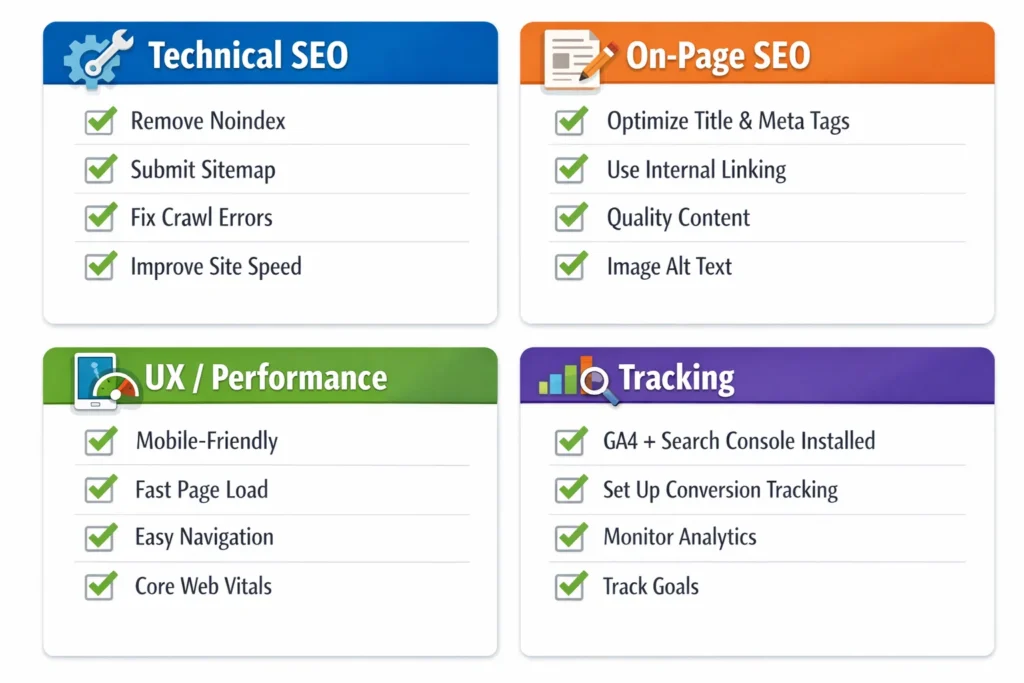
Technical SEO Launch Checklist
Make sure you avoid these critical launch mistakes:
- Confirm robots.txt isn’t blocking important pages.
- Remove any noindex tags from live pages.
- Ensure the website isn’t restricted by password protection or firewall rules.
- Test crawlability using an SEO crawler (Screaming Frog or similar).
- Verify canonical tags are correct and consistent.
- Fix 404 errors and broken internal links.
- Avoid redirect chains (keep redirects clean and direct).
- Confirm correct HTTP → HTTPS redirects.
- Confirm preferred domain version (www vs non-www).
- Generate a clean XML sitemap.
- Submit the sitemap in Google Search Console.
On-Page SEO Launch Checklist
Avoid launching with missing metadata and weak structure:
- Each page has a unique title tag.
- Each page has a relevant meta description.
- Every page has one clear H1.
- H2/H3 headings are structured correctly.
- Images have optimized alt text.
- URLs are clean, readable, and consistent.
- Internal links connect related pages naturally.
UX + Performance Launch Checklist
SEO and user experience must work together:
- Mobile layout works smoothly on real devices.
- Pages load fast (especially above-the-fold content).
- No intrusive popups on mobile.
- Navigation is simple and consistent.
- Core Web Vitals are within healthy range.
Tracking Launch Checklist
Avoid launching blind:
- GA4 installed correctly
- Key events/conversions set up (forms, calls, bookings)
- Google Search Console verified
- Sitemap submitted
- SEO rank tracking tool connected (optional but recommended)
How SEO Specialist USA Helps You Build a Website That Ranks
Developing a search-optimized website requires more than just good design, it requires the right SEO foundation from day one. That’s where SEO Specialist USA comes in.
We help businesses avoid costly SEO mistakes during website development by combining:
- Technical SEO expertise,
- Content strategy,
- And conversion-focused optimization.
What We Do for Search-Optimized Website Development
Here’s how SEO Specialist USA supports your website build or redesign:
Technical SEO Setup
- Crawlability and indexability checks
- Robots.txt and noindex review
- Canonical and redirect mapping
- Sitemap creation + Search Console setup
SEO-Friendly Website Structure
- Smart site architecture planning
- Internal linking strategy
- Clean URL structure setup
- Category/service page hierarchy
On-Page SEO Optimization
- Title tags and meta descriptions
- Heading structure (H1/H2/H3)
- Keyword mapping per page
- Content improvements for ranking
Performance & UX Improvements
- Page speed optimization
- Mobile-first enhancements
- Core Web Vitals improvement
- Better user journey + conversion paths
Want to avoid SEO mistakes before your website goes live?
Request a Technical SEO AuditFAQs
What is the biggest SEO mistake when building a website?
The biggest SEO mistake is launching a website that search engines can’t crawl or index due to robots.txt blocks, noindex tags, or incorrect settings. Even strong content won’t rank if Google can’t access and understand your pages.
What hurts SEO the most on a new website?
The most damaging factors include slow site speed, poor mobile usability, thin content, and weak website structure. Technical problems like broken redirects, duplicate URLs, and missing internal links can also stop a new website from ranking.
Does web design affect SEO rankings?
Yes, web design affects SEO because it impacts usability, navigation, mobile responsiveness, and page speed. A confusing layout, intrusive popups, and slow-loading pages can increase bounce rate and reduce engagement—signals that can indirectly hurt rankings.
How do I know if Google can crawl my website?
You can check crawlability using Google Search Console and by running a crawl test using SEO tools. If pages are blocked by robots.txt, noindex tags, or broken internal links, Google may struggle to crawl and index them properly.
What are the most important technical SEO elements during development?
Key technical SEO elements include crawlability, indexability, proper canonical tags, clean redirects, XML sitemap setup, HTTPS security, and mobile-first optimization. These ensure search engines can access, understand, and rank your pages effectively.
Should SEO be done before or after website launch?
SEO should be done before launch. If SEO is added after launch, you may need expensive fixes such as redirect mapping, restructuring pages, or resolving indexing problems. Early SEO planning prevents ranking loss and speeds up growth.
How can I avoid losing rankings during a website redesign?
To avoid ranking loss, create a full redirect map, keep high-performing URLs stable, preserve important content, and run a technical SEO audit before launch. Also verify Search Console indexing and fix crawl errors immediately after launch.
How long does it take for a new website to rank on Google?
Most new websites take several weeks to months to rank, depending on competition, content quality, backlinks, and technical setup. A well-structured, search-optimized website with strong content can start gaining visibility faster.