

In blog posts, include your city name in the title tag, H1 heading, first paragraph, at least one H2 subheading, the meta description, the URL slug, image alt text where relevant, and naturally throughout the body content. The goal is geographic relevance without keyword stuffing. Every placement should feel natural to a reader, not forced for a search engine.
Key Takeaways
-
 City names in the right HTML elements tell Google your content is geographically relevant to local searchers
-
The title tag and H1 heading are the most important placements for your city name
-
Keyword stuffing city names destroys readability and can trigger Google spam filters
-
City name usage should feel natural to human readers, not mechanical
-
Secondary and nearby city mentions expand your geographic relevance without creating separate pages
-
Image alt text and internal anchor text are underused but effective places for city name signals
Why City Names in Blog Content Matter for Local SEO
Google needs to understand the geographic context of your content. A blog post about roof repair that never mentions a city is useful general content. A blog post about roof repair specifically for homeowners in Phoenix, with specific local context, is far more relevant to someone in Phoenix searching for roofing help.
Including city names in the right places tells Google that this content was written for a local audience. It increases the chances of your blog appearing for location-based search queries, connecting your content to real local searchers who are ready to take action.
The challenge is doing this naturally. Over-optimizing, where a city name appears awkwardly in every other sentence, hurts both the reader experience and your rankings. Google’s spam filters are designed to detect exactly this kind of manipulative placement.
For a complete guide on local keyword research before you start writing, read how to find keywords for local SEO.
Title Tag: The Most Important Placement
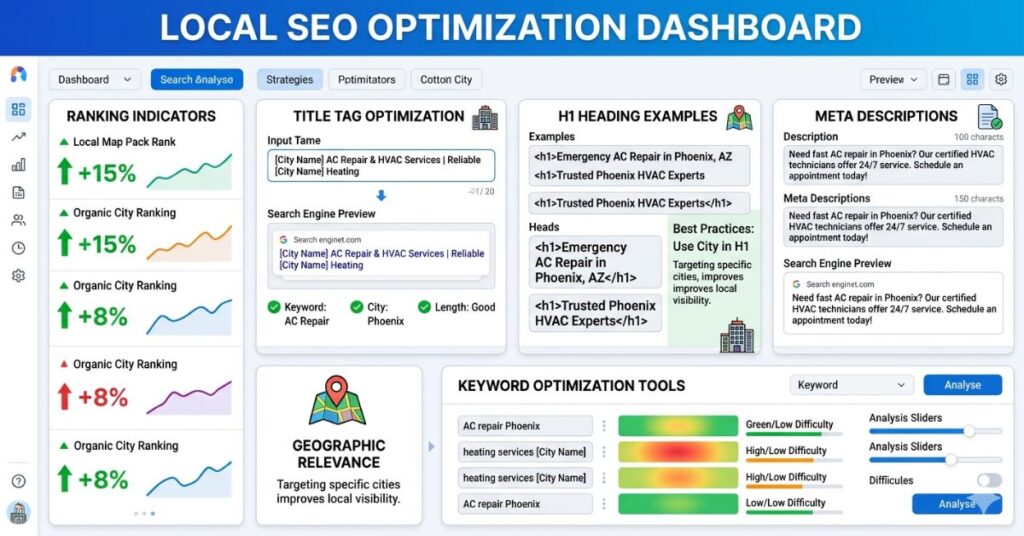
The title tag is the clickable headline that appears in Google search results. It is the single most important on-page SEO element, and for local blog posts, including your city name here is essential.
Title Tag Examples
- Without location (weak): ‘How to Choose the Right HVAC System’
- With location (strong): ‘How to Choose the Right HVAC System in Denver’
- With location and intent (strongest): ‘Best HVAC Systems for Denver Homeowners: What to Know Before You Buy’
Keep your title tag under 60 characters. Include your primary keyword and city early in the title. Avoid padding the title with extra words that dilute the signal.
H1 Heading: The First Signal in Your Content
The H1 is the main heading of your blog post, what appears at the top of the page above the content. It should closely match or be a natural variation of your title tag. Including your city name in the H1 reinforces the geographic signal for Google.
H1 Examples
- Without location: ‘Signs Your Home Needs a New Roof’
- With location: ‘Signs Your [City] Home Needs a New Roof’
- With location and context: ‘Signs Your Home Needs a New Roof in [City], Especially After Storm Season’
You do not need to force the city name in if it reads awkwardly. A natural integration is far better than a mechanical one. If including the city name does not read naturally in the H1, consider adjusting the angle of the post to make the local context organic.
Meta Description: Local Context for the Search Snippet
The meta description is the short summary that appears beneath your title in Google search results. It does not directly affect rankings, but it does affect click-through rates, and mentioning your city in the meta description reassures local searchers that this content is relevant to them.
Meta Description Example
- Without location: ‘Learn how to choose the right HVAC system for your home with this practical buying guide.’
- With location: ‘Choosing an HVAC system in Denver? This guide covers what local homeowners need to know before buying or replacing a unit.’
Keep meta descriptions under 155 characters. Include the city name naturally and make the description genuinely compelling to encourage clicks from local searchers.
URL Slug: Clean, Local, and Readable
The URL slug is the part of the web address that identifies your specific blog post. Including your city name in the slug reinforces the geographic relevance of the page for both search engines and users.
URL Slug Examples
- Without location: /blog/hvac-buying-guide/
- With location: /blog/hvac-buying-guide-denver/
- Alternative with location: /blog/denver-hvac-buying-guide/
Keep slugs short, lowercase, and hyphen-separated. Do not repeat the same word multiple times. Do not use underscores. Avoid stop words like ‘a,’ ‘the,’ and ‘in’ in the slug unless they are essential for readability.
First Paragraph: Establish Local Context Early
The opening paragraph of your blog post is one of the most SEO-weighted sections of your content. Google reads the first 100 words closely to understand what the page is about. Including your city name early in the introduction establishes local context immediately.
How to Do This Naturally
Write the introduction for a local reader. Start with a situation, problem, or question that is relevant to people in your specific city or region. Mention the location as part of the narrative, not as a tag-on at the end of a sentence.
- Forced example: ‘Roof repair is important. In Denver, roof repair is something homeowners need to think about.’
- Natural example: ‘If you own a home in Denver, the hail storms that roll through every spring are not just inconvenient. They are the number one reason local roofing companies stay busy year-round.’
The natural version is more engaging for a reader and more convincing to Google because it shows genuine local knowledge, not just a city name inserted for SEO purposes.
Subheadings (H2 and H3): Local Relevance Throughout
Your subheadings are another strong on-page SEO signal. Not every subheading needs a city name, but including it in at least one or two H2 headings throughout a long blog post reinforces the geographic relevance of the content.
Examples of Localizing Subheadings
- Generic: ‘Common Causes of Roof Damage’
- Localized: ‘Common Causes of Roof Damage for [City] Homeowners’
- Generic: ‘How to Find a Trusted Contractor’
- Localized: ‘How to Find a Trusted Roofing Contractor in [City]’
Use localized subheadings where they make sense contextually. Do not force city names into subheadings where the content is clearly general. Selective, natural use is far more effective than putting a city name in every heading.
Body Content: Natural Mentions, Not Keyword Stuffing

Within the body of your blog post, your city name should appear naturally several times, but there is no magic number. In a 1,000-word post, mentioning your city three to five times is reasonable. Mentioning it fifteen times looks like spam to Google and reads poorly for humans.
6 Ways to Include the City Naturally in Blog Body Content
- Reference local weather, climate, or seasonal conditions relevant to your service
- Mention local neighborhoods, landmarks, or well-known areas by name
- Refer to local regulations, codes, or market conditions specific to your city
- Use phrases like ‘local homeowners in [City],’ ‘residents of [City],’ or ‘the [City] area’
- Include a customer example or case study set in your city
- Reference local events, business associations, or community organizations where relevant
Each of these approaches adds a city mention that feels earned rather than inserted. They also demonstrate genuine local knowledge, which builds both SEO authority and reader trust.
Image Alt Text: An Underused Local Signal
Every image on your blog post should have descriptive alt text. Most people write generic alt text like ‘roofing photo’ or leave it blank. A local SEO best practice is to include your city name in at least one or two image alt text descriptions where it is genuinely relevant.
Alt Text Examples
- Generic: ‘roofing contractor working on a house’
- With location: ‘roofing contractor replacing shingles on a home in Denver CO’
- With location and service: ‘storm damage roof repair team at work in Denver Colorado’
Alt text is primarily for accessibility. Write it to describe the image accurately for visually impaired users first, and include the city name where it is a natural part of that description.
Internal Links with Local Anchor Text
When linking from one blog post to another page on your site, the anchor text you use is a local SEO signal. Linking with generic text like ‘click here’ or ‘learn more’ wastes the opportunity. Use descriptive anchor text that includes your service and location where natural.
Anchor Text Examples
- Weak: ‘For more information, click here.’
- Stronger: ‘Read our guide to roof repair in Denver.’
- Strongest: ‘Our Denver roofing team covers everything from storm damage to full replacements.’
For example, when discussing broader strategy, you might link internally like this: explore our local SEO strategies for small businesses.
Near the End of the Article: Reinforce and Convert
The final section of your blog post is a natural place to reintroduce your city name, summarize your local expertise, and connect the content to a call to action. Something like: ‘If you are dealing with roof damage in Denver this season, our team has been serving local homeowners for over a decade…’ gives the content a local, human sign-off that reinforces geographic relevance and sets up your CTA naturally.
What to Avoid: Common City Name Mistakes in Local Blog Content
- Keyword stuffing: Mentioning the city in every sentence looks manipulative and reads poorly
- Exact-match repetition: Always using the exact same phrase like ‘Denver roofing contractor’ repeatedly. Vary it with ‘Denver homeowners,’ ‘the Denver area,’ ‘local roofing in Denver,’ and so on.
- Irrelevant placement: Forcing a city name into a paragraph where the content is genuinely general and location does not add context
- Missing the title and H1: These are the highest-priority placements. A blog post that uses the city name 10 times in the body but omits it from the title and H1 loses most of its local SEO value
- Using only one city: If you serve multiple cities, naturally mention neighboring areas in the body content. This expands your relevance without creating thin duplicate pages.
For how this fits into a complete content and local SEO approach, read local SEO strategies for small businesses.
City Name Placement: Quick Reference Summary
- Title tag: Include the primary city name, highest priority
- H1 heading: Match or closely reflect the title tag with the city included
- Meta description: Include city name naturally within 155 characters
- URL slug: Add city name for local posts, keep it clean and short
- First paragraph (first 100 words): Mention city early and naturally
- At least one H2 or H3: Include city in a relevant subheading
- Body content: Three to five mentions in a 1,000-word post, varied and natural
- Image alt text: Include city in at least one or two image descriptions
- Internal link anchor text: Use descriptive local anchor text
- Closing section: Reinforce local expertise before the CTA
How SEO Specialist USA Writes Locally Optimized Blog Content
SEO Specialist USA produces blog content that is genuinely optimized for local search without the robotic feel of over-stuffed keyword placement. Every blog post is planned around a specific local search intent, structured with proper city name placement across all key SEO elements, and written to sound like a real expert speaking to a real local audience.
The result is content that ranks in local search, gets read by local customers, and drives calls and inquiries for the business it was written for.
Frequently Asked Questions