
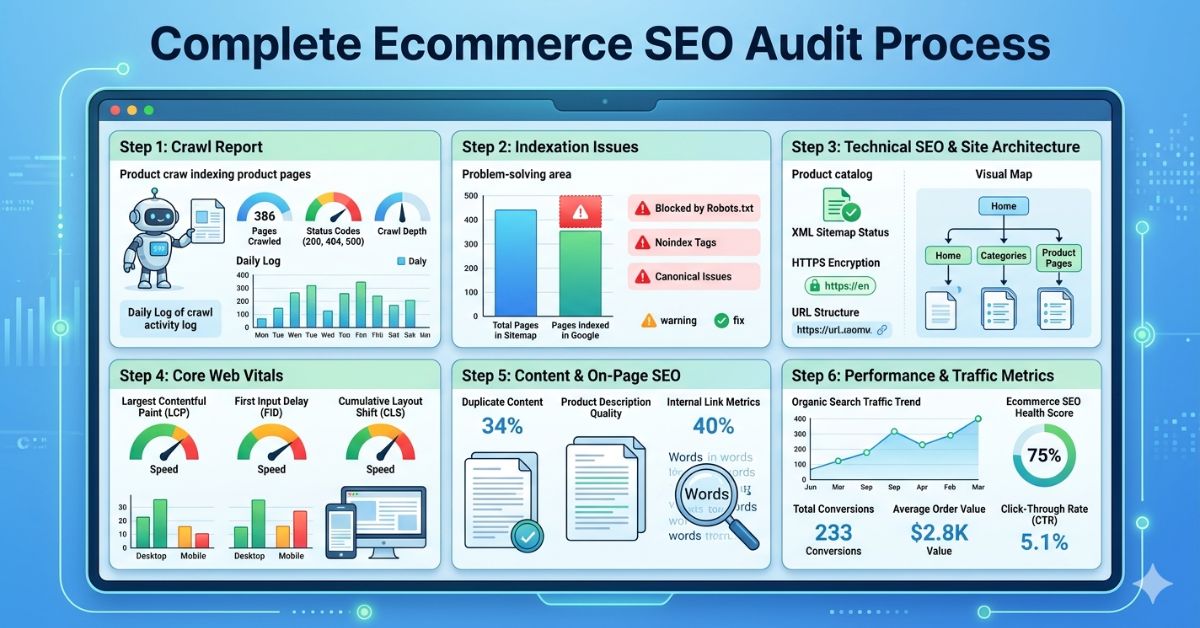
To conduct an effective ecommerce SEO audit, work through six sequential areas: crawl and indexation health, duplicate content and canonical configuration, page speed and Core Web Vitals, structured data and schema validation, on-page optimization of key page types, and off-page authority signals. Use a combination of Google Search Console, a site crawl tool (Screaming Frog or Sitebulb), Google Analytics 4, and a backlink analysis tool. Document every issue with its severity, the pages affected, and the recommended fix, then prioritise by revenue impact.
Key Takeaways
-
 An ecommerce SEO audit must cover six distinct areas, addressing only one or two misses the systemic issues that cause the most damage
-
Always start with crawl and indexation, if Googlebot cannot access your pages, no other SEO work matters
-
Prioritise findings by revenue impact, not by technical severity, a schema error on your highest-converting product category page matters more than a broken link on a thin tag page
-
Use real data from Google Search Console and GA4 alongside crawl tool output, combining platform data with raw crawl data produces more actionable findings
-
An audit without a prioritised action plan is just a list of problems, the output should be a phased remediation roadmap
Before You Start: Tools You Need

- Google Search Console (free): Crawl coverage, indexation status, Core Web Vitals field data, manual actions, and keyword performance
- Google Analytics 4 (free): Organic traffic by page, engagement metrics, and conversion data to identify high-value pages
- Screaming Frog SEO Spider (free up to 500 URLs, paid for full crawl): Comprehensive on-page data including titles, meta descriptions, canonicals, hreflang, response codes, and internal links
- Sitebulb or Botify (paid): More advanced crawl analysis with visual site architecture and log file integration for large stores
- Ahrefs or Semrush (paid): Backlink profile analysis, keyword rankings, and competitor gap analysis
- Google Lighthouse or PageSpeed Insights (free): Core Web Vitals measurement at the page level
- Google’s Rich Results Test (free): Schema markup validation for individual pages
- Screaming Frog Log File Analyser (paid): Log file analysis to understand Googlebot’s actual crawl behaviour
Step 1: Crawl and Indexation Health
Start here. If Google cannot crawl and index your pages, nothing else matters. This step diagnoses the accessibility of your store to search engines at a fundamental level.
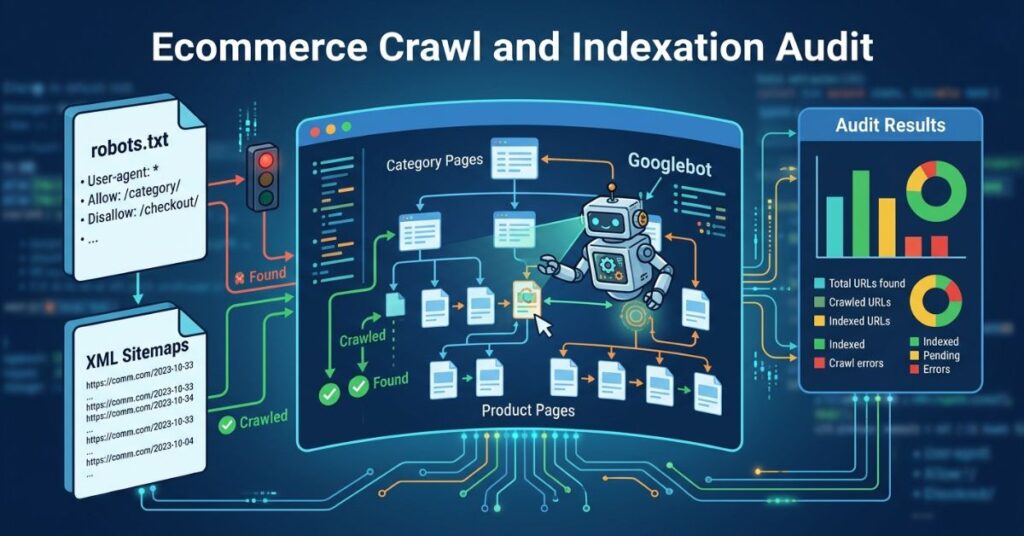
1a. Audit Your Robots.txt File
- Access it at yourdomain.com/robots.txt and review every disallow rule
- Ensure important page types, product pages, category pages, and the homepage, are not accidentally blocked
- Common ecommerce robots.txt errors: blocking faceted navigation pages that should be blocked but also blocking important subdirectories; missing disallow rules for parameter-generated URLs
- Use Google Search Console’s robots.txt tester to validate the impact of each rule
1b. Review Google Search Console Coverage Report
- Check the total number of indexed pages and compare against your expected page count
- Investigate all pages in the ‘Error’ category, 404s, server errors, and redirect errors require immediate attention
- Review ‘Excluded’ pages, understand why each exclusion is happening. Valid exclusions (noindexed admin pages) vs. problematic exclusions (product pages excluded due to a canonical mismatch) require different responses
- Compare the Indexed page count over time, a declining index count without a corresponding catalog reduction is a serious signal requiring investigation
1c. Audit Your XML Sitemap
- Access it at yourdomain.com/sitemap.xml (or check Search Console for the submitted sitemap URL)
- Verify the sitemap includes all canonical, indexable pages and excludes paginated variants, parameter URLs, and noindexed pages
- Cross-reference sitemap URLs against the Search Console Coverage report, URLs in the sitemap that are in the ‘Excluded’ category indicate a canonical or noindex misconfiguration
- Check for errors in how the sitemap was processed in Search Console’s Sitemaps report
1d. Analyse Log Files
For stores with more than 5,000 pages, log file analysis provides the most accurate picture of what Googlebot is actually doing on your site, which URLs it is crawling, how frequently, and which it is ignoring.
- Use Screaming Frog Log File Analyser or a similar tool to process server log data
- Identify pages receiving frequent Googlebot visits (confirming they are being indexed regularly) versus pages that are rarely or never visited (confirming they may be orphaned or blocked)
- Compare the URL distribution of Googlebot’s crawl against your intended crawl priority, if faceted filter pages are consuming a disproportionate share of crawl activity, this confirms a crawl budget waste problem
Step 2: Duplicate Content and Canonical Configuration
Duplicate and near-duplicate content is endemic in ecommerce. This step identifies where it exists and confirms that canonical configurations are correctly directing Google to the intended URL.
2a. Identify Duplicate Title Tags and Meta Descriptions
- Run a full Screaming Frog crawl and export the title tag and meta description data
- Sort by duplicates, any significant number of pages sharing the same title or meta description is a problem
- Common ecommerce causes: product variants sharing a page template with no dynamic title population; category pages using the same default description
2b. Audit Canonical Tags Across Page Types
- Check that all faceted navigation and filter URLs canonical back to the primary category page
- Verify product variant pages (colour, size) point to the correct canonical, typically the primary product page, unless each variant has meaningful independent search demand
- Confirm paginated pages (/page/2/, /page/3/) are handled correctly, self-referencing canonicals on each page, or canonicals to page one, depending on content overlap
- Check for canonical chains, canonicals pointing to pages that themselves have a different canonical, which Google does not follow reliably
- Cross-reference canonicals with the sitemap: URLs in the sitemap should be the canonical URL, not a variant
2c. Handle Product and Category Variations
- Identify product variant pages (size, colour, material) and decide: should each variant have its own indexed page (if it has independent search demand) or should they all canonicalise to the primary product page?
- Check for manufacturer product descriptions shared with competing retailers, consider whether these need to be rewritten with unique content to avoid content duplication signals
- Identify empty or near-empty category pages generated by filtered navigation that have been indexed, these should be noindexed or excluded via robots.txt
Step 3: Core Web Vitals and Page Speed
Measure real-user performance data, not just lab scores. Google’s ranking signal uses field data from the Chrome User Experience Report, not Lighthouse scores alone.
3a. Check Field Data in Search Console
- Review the Core Web Vitals report in Search Console, it shows pages grouped as Good, Needs Improvement, or Poor based on real user data
- Identify which page types are failing: product pages, category pages, or checkout pages typically have the worst scores on ecommerce sites
- Note the specific failing metric per page group, LCP failures have different root causes from CLS or INP failures
3b. Diagnose Specific Failures with Lighthouse
- Run Google Lighthouse on a representative product page, category page, and homepage
- LCP issues: identify the LCP element (usually the hero product image) and diagnose whether it is caused by slow server response, unoptimised image format, missing preload tag, or render-blocking resources
- CLS issues: identify elements causing layout shift, typically images without explicit dimensions, dynamically injected banners, and asynchronously loaded web fonts
- INP issues: profile JavaScript execution during common interactions, add-to-cart clicks, filter selections, quantity updates, using Chrome DevTools Performance panel
3c. Third-Party Script Audit
- Use the Network tab in Chrome DevTools to identify all third-party scripts loading on key pages
- Flag scripts that load synchronously in the document head, these block rendering and delay LCP
- Identify scripts that can be deferred or lazy-loaded without affecting page functionality
- Prioritise removal or deferral of analytics pixels, chat widgets, remarketing tags, and A/B testing scripts that load early and delay interactivity
Step 4: Schema Markup and Rich Results
Ecommerce stores have the most to gain from correct schema implementation, and the most schema to validate across a large catalog.
4a. Validate Product Schema
- Test representative product pages using Google’s Rich Results Test tool
- Check for required fields: name, image, description
- Check for recommended fields that enable rich results: price, priceCurrency, availability, brand, GTIN or MPN, AggregateRating (star ratings in results)
- Confirm that price and availability data in schema matches the actual page content, discrepancies can trigger manual quality flags
- Test for AggregateRating markup specifically, this is what enables star ratings to appear in search results and is one of the highest-impact schema types for click-through rates
4b. Check Breadcrumb and Category Schema
- Validate BreadcrumbList schema on product and category pages
- Confirm that breadcrumb structured data matches the visible breadcrumb navigation on the page
- Check for ItemList schema on category pages, this feeds Google’s AI-powered product discovery surfaces
4c. Review Search Console Schema Errors
- Check the Enhancements section in Search Console for any schema errors or warnings
- Investigate pages flagged as having structured data issues, these are excluded from rich results eligibility
Step 5: On-Page Optimisation of Key Page Types
An ecommerce audit includes a targeted on-page review of the page types that drive the most organic revenue.
5a. Category Pages
- Does each category page have a unique, keyword-optimised H1 that targets the primary search term for that category?
- Is there unique, indexable content beyond the product grid? A text block of 150 to 300 words addressing the category is sufficient to give Google substantive content to rank
- Are title tags and meta descriptions unique for each category, including the primary keyword and a relevant local or category modifier?
- Are the category pages cannibalising each other? Check for multiple category pages targeting the same keyword set
5b. Product Pages
- Are product descriptions unique? Flag all pages using manufacturer descriptions verbatim, which are shared across competing retailer sites
- Do title tags include the product name, key differentiating attributes (brand, model, spec), and a commercial modifier where natural?
- Are images optimised with descriptive file names and accurate alt text that naturally includes product-relevant terms?
- Are out-of-stock product pages handled correctly? They should return a 200 status with OutOfStock schema, not a 404, to preserve link equity and ranking history
For on-page SEO fundamentals that apply across page types, see on-page SEO services.
Step 6: Off-Page Authority Assessment
The final step of an ecommerce SEO audit reviews the external signals that determine how much authority Google assigns to the store.
6a. Backlink Profile Health
- Use Ahrefs or Semrush to review the store’s referring domain count, domain rating, and backlink growth trend
- Identify the domain types linking to the store, editorial links from relevant product and industry sites carry far more value than directory or forum links
- Look for toxic or spammy backlink patterns that may require disavowal, sudden spikes in links from unrelated foreign sites are a common spam signal
- Compare the store’s domain authority against the top three ranking competitors for primary category keywords, the authority gap indicates how much off-page work is needed
6b. Competitor Authority Comparison
- Identify the top three organic competitors for your highest-revenue category keywords
- Compare referring domain count, domain rating, and top linking sources
- Identify high-authority linking domains that link to competitors but not to your store, these are link building opportunities
For building off-page authority, see off-page SEO services.
How to Prioritise Your Findings
An ecommerce SEO audit will produce dozens of findings. Prioritise them against two criteria: revenue impact (how many high-value pages or search queries does this affect?) and implementation effort (how long does this take to fix?).
- Priority 1, High impact, low effort: Schema errors on top product pages, noindex tags on indexed pages, critical crawl errors. Fix immediately.
- Priority 2, High impact, higher effort: Core Web Vitals improvements, canonical tag template fixes, category page content additions. Schedule in the next sprint.
- Priority 3, Medium impact, variable effort: Faceted navigation URL management, duplicate description rewrites, internal link architecture improvements. Plan into a roadmap.
- Priority 4, Low impact: Minor on-page improvements on low-traffic pages. Address when capacity allows.
How SEO Specialist USA Conducts Ecommerce SEO Audits
SEO Specialist USA conducts ecommerce technical SEO audits across all six areas described in this guide. The team uses a combination of Screaming Frog, Sitebulb, Google Search Console, Google Analytics 4, Ahrefs, and Google Lighthouse to produce a comprehensive audit with a prioritised, phased action plan ordered by revenue impact.
Clients receive a clear report, a detailed remediation roadmap, and ongoing support during the implementation phase to ensure fixes are applied correctly.
Frequently Asked Questions